

The Japanese language uses many more characters than a traditional QWERTY keyboard. However, the language can still be typed using English letters.
At first glance, it may seem that a writing system involving two syllabaries, each composed of sounds represented by sixty-nine different characters – hiragana and katakana, or collectively, kana – incorporated with several thousand unique and complex characters derived from the Chinese language – kanji – could pose a challenge for those wishing to type the language using a traditional English QWERTY keyboard. On the contrary, typing in Japanese on a computer is very easy once a few simple practices and two or three exceptions are learned.
We also recommend reading:
- How to use and type small hiragana and katakana
- How to type in Japanese or Chinese in games and programs that do not accept
- Learn 200 Japanese Onomatopoeias
Activating Japanese Character Typing and
Typing in Japanese characters using a computer can be easily accomplished using the Microsoft IME input method editor. Note that ESL students should write an essay in English first or use Assignment Pay to do their essays. This can simplify their writing process.
To get started, simply highlight the section of text you wish to type in Japanese. Then, hold down the left “Alt” key on the keyboard and press the “t” key while keeping the “Alt” key pressed.
Doing this will change the typing layout of the keyboard to Japanese. You can then type the text in Japanese characters using the Romanji input method. When you finish typing in Japanese, press the “t” key again while holding down the “Alt” key to return to the normal typing layout of the keyboard. And there you go! You have successfully typed Japanese characters on your computer.
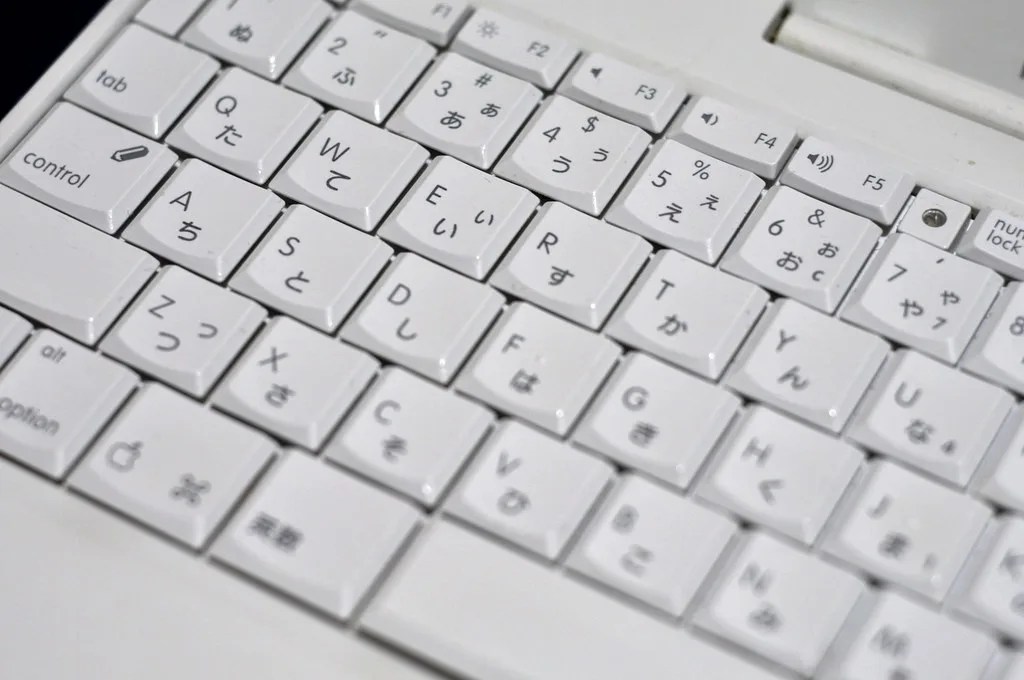
Typing Words in Japanese with English Characters
The computer input method for Japanese is ingenious and mundane. Since Japanese, at its most basic level, employs syllabaries – sets of characters, known as kana, that represent all possible sounds (syllables) of the language – in its written language, in most cases, you simply need to type the sounds of any given word and let the computer do the rest.
For example, to type the Japanese word for “friend” – “TOMODACHI” – you only need to spell out the four syllables of the word, “to”, “mo”, “da”, and “chi”; in hiragana input mode, each character will appear as the sound is completed (i.e., after each vowel). The four characters will be underlined, indicating that the computer is ready to accept them as a single word. Pressing the Enter key will confirm the word, allowing another to begin. The process of typing a word in katakana is the same when it is the selected input method.
The previous example leaves the word in hiragana; however, it is very simple to convert the characters to kanji. If the space bar, instead of the Enter key, is pressed after the four characters appear on the screen, the computer will automatically convert the hiragana characters to the most likely kanji for the pronunciation.
Confusingly, many Japanese words consist of the same syllables but are made up of completely different kanjis. For this reason, the first kanji selection that appears when the space bar is pressed may not be the correct kanji for the intended word. In that case, a dropdown menu displaying additional kanji permutations can be activated by pressing the space bar again.

The Exceptions: Typing Japanese Particles, the “Small TSU” and “NN”
Some kana are small exceptions to the direct rules above. Characters like “GA”, “WA”, and “WO” (pronounced with a long “o” or, in some cases, “wo”) denote parts of speech, in addition to forming words (with the notable exception of the kana for “O”). Some, like “GA”, are typed as described above; however, others must be typed differently than they normally sound.
The particle pronounced “WA” in a conversation denotes the topic of a sentence. The character is written exactly like the kana used in forming words that is pronounced “HA”. By the way, linguists from Do My Writing, note that there is another character pronounced “WA” that will produce that character instead of the desired particle, so it is important to keep this exception in mind when typing the particle “WA”.
Another exception is for the particle “WO”. Again, there is another character with the same long “o” sound; to type the particle “WO”, the syllable “WO” must be typed instead of its pronunciation “O”. Following this with the Enter key will remove the underline.
The Japanese language also has a “pause character” sometimes called “small TSU”. This character represents a momentary pause or retention of the first consonant of the following syllable and often appears in verb conjugations and various counters. Typing the repeated consonant once before typing the next syllable will produce a small TSU. For example, to type “three (things)” or MITTSU, type “mi”, “t”, and “tsu”.
Finally, there is a unique character pronounced approximately “NN”; it is the only kana that does not end in a vowel sound. As its closest approximate sound is that of an “n” ending in English (as in “taken”), it is typed – as seen above – using a double “n”.
The Simplicity of Typing in Japanese
Typing in Japanese is simply a matter of typing the pronunciation of the words and remembering a few exceptions. Considering the ease with which Japanese can be typed in English, it may not be surprising that this input method is more or less how native Japanese speakers type their language on computers. Learning all the slang and countless emoticons they use in casual text communication would be a much more complicated task.

Community
Comments
0 comments
There are no published comments in this language yet.
Send comment